
Getting orders on Flipkart is one thing. Getting customers to leave a review after receiving the product is another challenge.
Many sellers have products with good sales but only a small number of ratings and reviews. A product may have 100 orders but only a few customers leave feedback. Over time, this can become a problem because shoppers often look at the product rating and reviews before deciding whether to place an order.
If your Flipkart product has low reviews, fewer ratings, or limited customer feedback, you are not alone.
Flipkart has recently introduced a Review Accelerator program that gives sellers an additional way to encourage eligible customers to share genuine photo and video reviews of their purchases.
In this guide, we will explain what the program is, how sellers can opt in, and some practical ways to improve product reviews and ratings on Flipkart.
Why Are Product Reviews Important on Flipkart?
When customers are comparing similar products, reviews can make a significant difference.
Imagine two products with similar prices and features:
- Product A: 4.2 rating with 18 reviews
- Product B: 4.3 rating with 850 reviews
Even though the ratings are similar, many customers may feel more confident buying the second product because there is much more customer feedback available.
Reviews can help shoppers understand things that product images and descriptions cannot always communicate, such as:
- Actual product quality
- Size and fitting
- Colour accuracy
- Packaging
- Material quality
- Product usability
- Whether the product matches the description
For sellers, genuine customer reviews can therefore help build social proof and buyer confidence.
However, getting customers to voluntarily leave reviews can be difficult.
What Is Flipkart Review Accelerator?
Flipkart’s Review Accelerator is a seller-side program designed to encourage eligible customers to submit photo and video reviews for selected products.
The program can be accessed through the Flipkart Seller account, where sellers can see products recommended for participation.
Instead of trying to convince customers individually to leave reviews, sellers can use the program provided through Seller Hub to opt in eligible products.
The exact products available for participation may vary from seller to seller, so sellers should check their own Review Accelerator section rather than assuming that every product will be eligible.
How to Use Flipkart Review Accelerator
If the Review Accelerator option is available in your Flipkart Seller account, you can follow these steps.
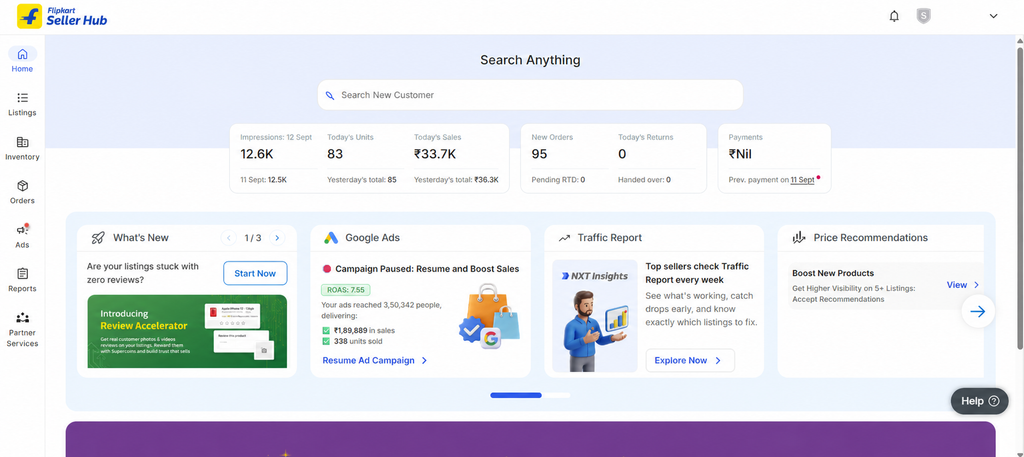
Step 1: Login to Your Flipkart Seller Account
First, log in to your Flipkart Seller account using your registered seller credentials.
Step 2: Go to the Growth Section
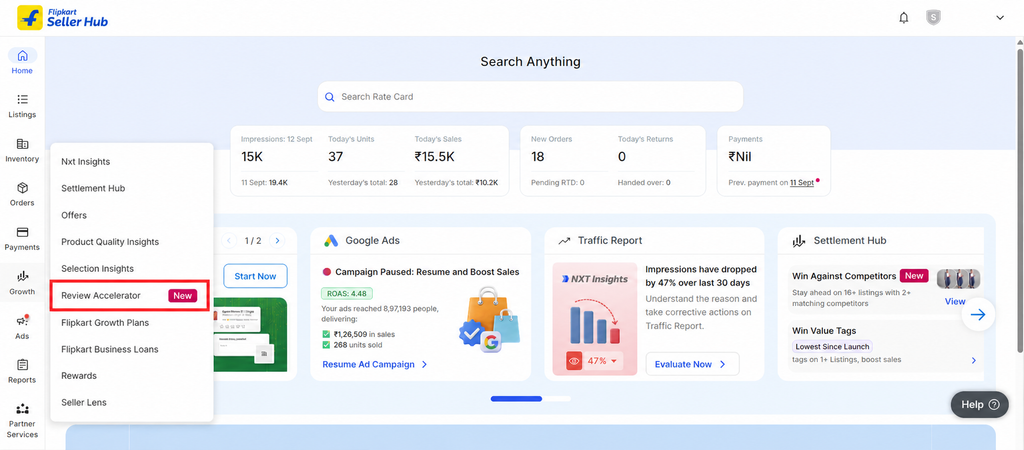
After logging in, look at the main menu of your Seller account.
Go to the Growth section.
Inside the Growth section, look for Review Accelerator.
Click on it to open the Review Accelerator page.
Step 3: Check the Recommended Products
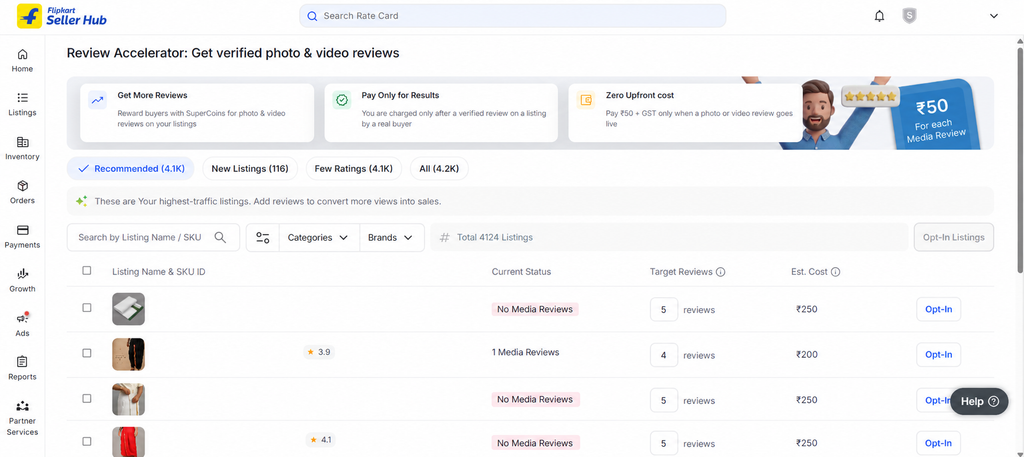
After opening Review Accelerator, check the products recommended for participation.
Flipkart may display specific products that are eligible or recommended for the program.
This is an important step because you should review the recommended products before opting in.
Look at factors such as:
- Product demand
- Recent orders
- Existing rating
- Number of reviews
- Product quality
- Return rate
- Customer complaints
- Profit margin
A product with regular sales but very few reviews may be more interesting for a seller than a product that already has hundreds of reviews.
Step 4: Opt In
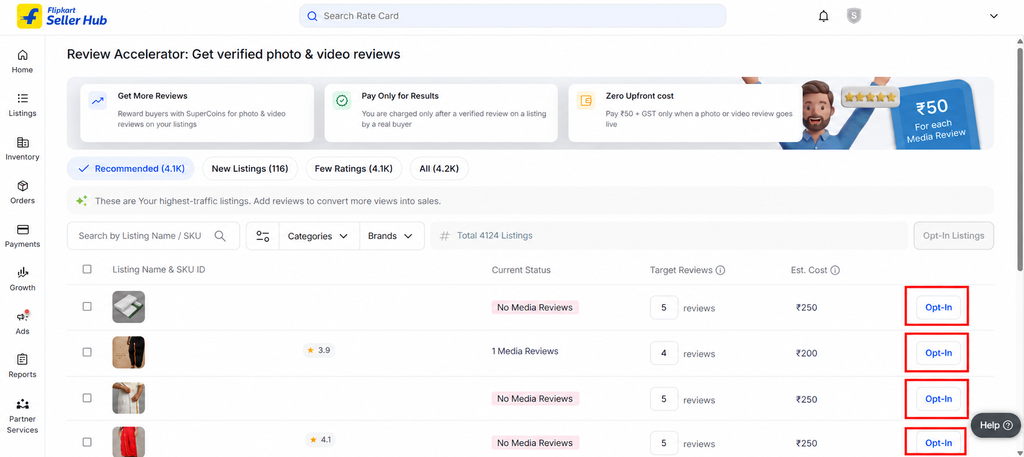
Once you have reviewed the recommended products, select the products you want to participate with and click Opt-in.
Your selected products will then participate in the Review Accelerator program according to Flipkart’s applicable terms and conditions.
That’s it.
The process itself is quite simple, but the important part is deciding which products should be included.
Should You Opt In Every Product?
Not necessarily.
This is where sellers need to think about the economics rather than simply opting in all eligible products.
If Flipkart is offering a review incentive for eligible purchases, there can be a cost associated with generating those reviews. Therefore, sellers should consider whether the potential benefit of additional genuine reviews justifies the cost.
For example, suppose you have:
Product A
- 500+ orders
- 4.4 rating
- 600 reviews
and
Product B
- 300 orders
- 4.1 rating
- 12 reviews
Product B may have a bigger review-generation problem.
Instead of looking only at the number of orders, consider the review gap.
A Simple Product Selection Strategy
You can divide your products into three groups.
1. High-Priority Products
Consider these first:
- Products with regular orders
- Products with very few reviews
- Products with good customer feedback
- Products with low return rates
- Products where additional reviews can improve buyer confidence
2. Products to Evaluate Carefully
These may require more analysis:
- Products with moderate ratings
- Products with higher return rates
- Products receiving frequent complaints
- Products with inconsistent product quality
3. Products to Avoid for Now
Be cautious with products that have:
- Poor product quality
- High return rates
- Frequent negative feedback
- Incorrect product descriptions
- Packaging problems
- Size or colour complaints
Getting more reviews on a problematic product doesn’t solve the underlying issue.
It can actually make the problem more visible.
Review Accelerator Is Not a Replacement for Product Quality
This is probably the most important point for sellers.
The objective should not be to simply increase the number of reviews.
The objective should be to increase the number of genuine and useful customer reviews while improving the overall customer experience.
If customers receive a product that matches the listing, is properly packed and works as expected, the chances of positive feedback naturally become better.
Before using any review-focused program, check your:
Product → Listing → Images → Description → Pricing → Packaging → Delivery → Customer Experience
If there is a problem in any of these areas, fix it first.
How Else Can You Increase Genuine Reviews on Flipkart?
Review Accelerator can be one part of your review strategy. Sellers should also work on the complete customer experience.
1. Improve Your Product Listing
Your product title, images and description should accurately represent what the customer will receive.
Don’t use exaggerated claims or misleading images just to increase orders.
A customer who receives exactly what they expected is more likely to have a positive experience.
2. Use Better Product Images
Images are especially important because customers cannot physically inspect your product before purchasing.
Show:
- Front and back views
- Different angles
- Product dimensions
- Material or fabric details
- Important features
- Usage images
- Packaging where relevant
For products where colour or size matters, make the information as clear as possible.
3. Improve Packaging
A good product can still receive negative feedback if it arrives damaged or poorly packed.
Review your packaging regularly and identify products that are particularly vulnerable during transportation.
4. Reduce Product Returns
A high return rate can be a sign that something is wrong with the customer expectation or product experience.
Check your return reasons regularly.
For example:
“Size issue”
may indicate that your size chart needs improvement.
“Product different from image”
may indicate an issue with your product photography.
“Quality not as expected”
may indicate that your listing is creating unrealistic expectations.
Use return data to improve the product and listing.
5. Don’t Try to Manufacture Reviews
Sellers should never try to create fake reviews or manipulate customer feedback.
Avoid practices such as:
- Asking people who didn’t purchase the product to review it
- Creating fake buyer accounts
- Posting reviews yourself
- Paying people outside the applicable program to create misleading reviews
- Coordinating artificial ratings
The goal should always be genuine customer feedback.
More reviews are useful only when they represent real customer experiences.
What About Low Ratings?
Getting more reviews is only half of the equation.
Suppose a product has:
4.0 rating from 10 reviews
and you suddenly get 100 more reviews.
If customers continue experiencing the same problem, the additional reviews may not improve the rating.
Therefore, sellers should look at why customers are giving low ratings.
Read negative reviews carefully and look for repeated patterns.
For example:
| Customer feedback | Possible action |
|---|---|
| Product smaller than expected | Improve dimensions/size information |
| Colour different | Improve product photography |
| Poor packaging | Upgrade packaging |
| Quality issue | Review manufacturing/QC |
| Product doesn’t match description | Rewrite listing |
| Missing accessories | Improve packing checklist |
This approach can improve both ratings and customer satisfaction.
Don’t Chase 5-Star Ratings — Chase Better Customer Experience
One mistake sellers sometimes make is focusing entirely on getting a 5-star rating.
A better approach is to focus on delivering a product that customers genuinely like.
If the product quality improves, the listing becomes more accurate, packaging gets better and customer expectations are managed properly, positive reviews are more likely to follow naturally.
Your goal should be:
Better Product → Better Experience → Better Reviews → Stronger Buyer Confidence
rather than:
More Orders → More Reviews → More 5-Star Ratings
The difference is important.
Final Thoughts
Low reviews can be a genuine challenge for Flipkart sellers, particularly when a product is receiving regular orders but has not accumulated enough customer feedback.
The Review Accelerator program gives eligible sellers another option to encourage genuine photo and video reviews. The process is relatively straightforward:
Login → Growth → Review Accelerator → Recommended Products → Opt-in
But selecting the right products is more important than simply opting in everything.
Before participating, evaluate your product quality, existing rating, review count, return rate, customer complaints and overall profitability.
And remember: Review Accelerator can help create an opportunity for more customer feedback, but it cannot replace a good product and a good customer experience.
For long-term marketplace growth, sellers should work on the complete chain:
Product Quality + Accurate Listing + Good Images + Competitive Pricing + Reliable Packaging + Customer Experience + Genuine Reviews
That is what ultimately helps build a stronger product on Flipkart.
Need Help With Your Flipkart Business?
If you want to understand Review Accelerator, improve your Flipkart product listings, increase customer reviews, optimize your marketplace performance, or have any other query related to your e-commerce business, feel free to reach out to Path 2 Ecom.
Our team can help you understand the right strategy for your products and identify areas where your Flipkart business can improve.
Have a question about your Flipkart business? Get in touch with us — we’re happy to help.